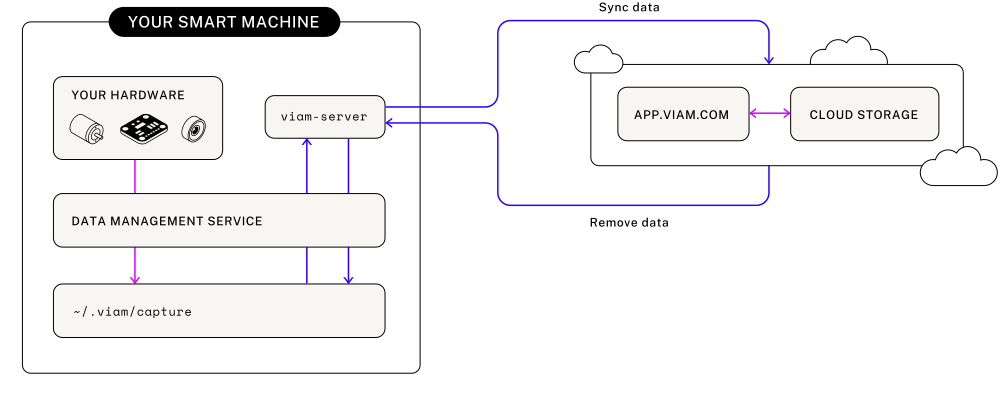
The data management service writes data from your configured Viam resources to local storage on your edge device and syncs data from the edge device to the cloud:
The data management service writes captured data to local edge device storage (~/.viam/capture by default).
The data management service syncs data to the Viam cloud at a configured sync interval using encrypted gRPC calls and deletes it from the disk once synced.
You can capture and sync data independently; one can run without the other.
Configure data capture and sync for individual resources
Navigate to a configured resource in Builder mode.
Find the Data capture section in the resource panel.
Click + Add method.
If you see a Capture disabled on data management service warning, click Enable capture on data management service.
Select a Method to capture data from.
Camera capture methods
Camera components provide two similar, but distinct capture methods:
GetImages: Returns an image per camera sensor for 3D cameras (for example, “color” as JPEG for RGB sensors, “depth” as a depth map for depth sensors), or a single image for webcams, RTSP cameras etc.
Set the capture Frequency in hertz, for example to 0.2 with GetImages on a camera to capture an image every 5 seconds.
Save your config.
You can add multiple methods with different capture frequencies.
Click to see resources that support data capture and cloud sync
The following components and services support data capture and cloud sync:
For more information on available configuration attributes and options like capturing directly to MongoDB or conditional sync, see Advanced data capture and sync configurations.
To leverage AI, you can create a dataset with the data you’ve captured.